

Have you set a goal for the GMAT but are unsure what you need to score in each section to achieve it? Do you have a section score from a practice test or diagnostic and are wondering what total scores are possible with it? Confused about the relationship between your total score and your percentile? Or do you just want to better understand how the GMAT is scored? We’re here to help! This post will cover what you need to know with an interactive GMAT score calculator and a full breakdown of what it all means.
Table of Contents
How Are GMAT Scores Calculated?
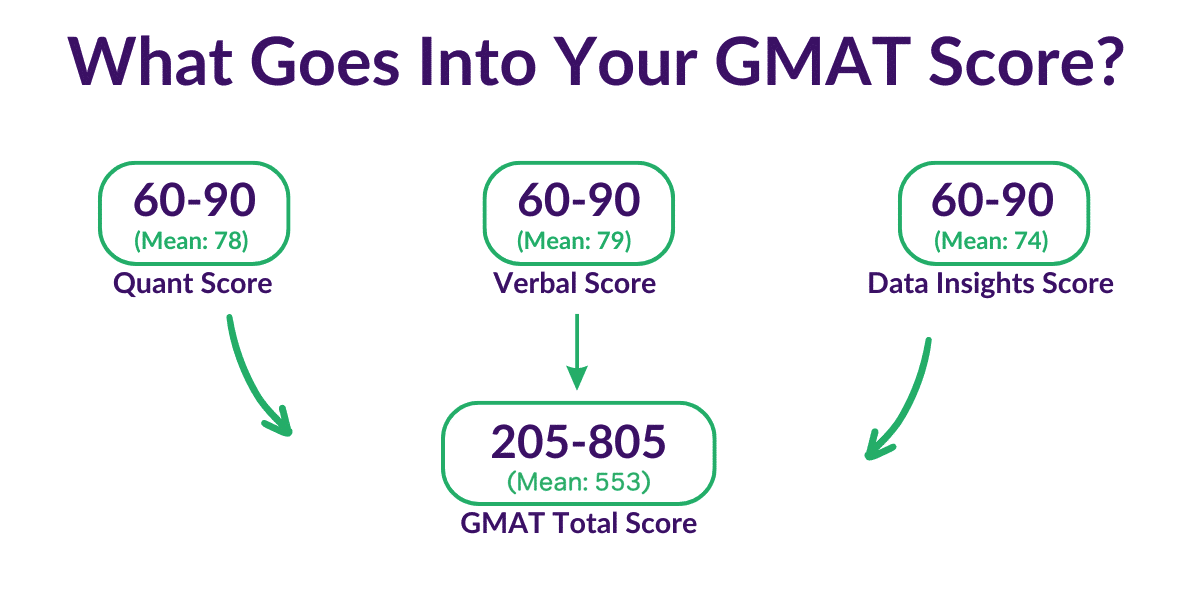
Your total GMAT score is calculated from your performance in three main sections: Quantitative Reasoning, Verbal Reasoning, and Data Insights. Each section is graded separately on a scale of 60 to 90. These individual values are then input into a formula to produce a total score ranging from 205 to 805, with each section carrying the same weight in your final total. When you receive your official report, you will see scores for each section, as well as your overall total and your percentile rankings for each.
This has been the structure of the exam since the GMAT Focus Edition fully replaced the classic GMAT in early 2024. As of 2026, it is the only version of the test you can take. If you see a resource describing a GMAT scored out of 800, with an essay or a separate Integrated Reasoning section, that information is out of date.
How Accurate are GMAT Score Calculators?
The truth is that GMAC, the people who make the GMAT, very closely guard the inner workings of their scoring systems. Thus, they have never publicly released any kind of official GMAT score calculator.
So, what is known about how GMAT scores are calculated? Well, the GMAT is not just testing your individual performance against the test itself but rather your performance compared to other test takers. You could read in much more detail about the mysteries of GMAT scoring, but here are the basics you need to know:
- Your section score represents both a snapshot of how many questions you answered correctly and the difficulty of those questions. Two test takers could get the same amount of questions right in a Quant section, but have very different section scores if one tester saw much harder questions.
- Your section percentile ranking shows how you performed in that section in relation to other test takers. For example, if you received an 82 on the Quant section, you’d have a percentile ranking of 75%. In other words, you performed better than 75% of the test takers in GMAC’s most recent published sample, which covers exams taken from 2020 through 2025.
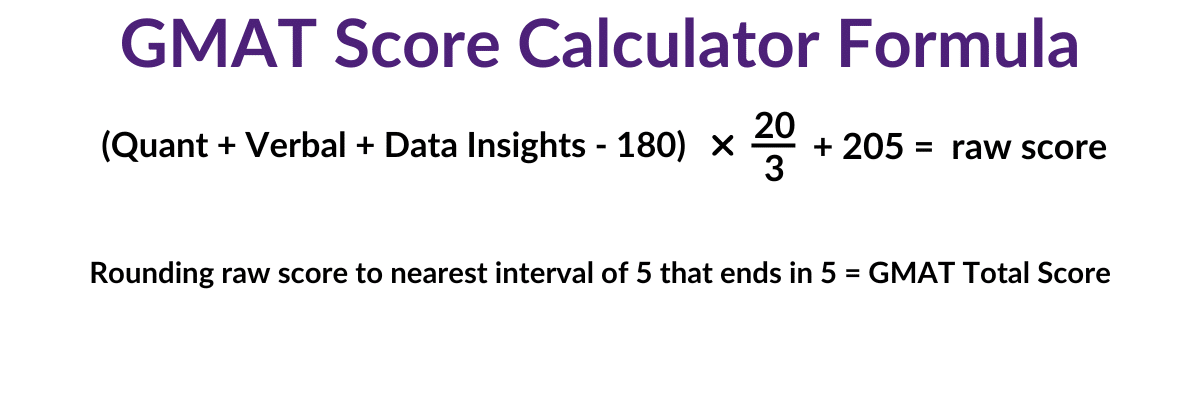
- Your total score represents your performance across all three sections. In the image earlier in this article, we represent that by adding your section scores together to produce a total composite, but it’s not quite that straightforward. Rather, this formula shows how we arrived at your final total:
A Note On Calculations
As stated earlier, GMAC closely guards its scoring schemes and algorithms. The exact scoring system for the GMAT is only known by GMAC. As such, our GMAT score calculator—like all third-party GMAT calculators—is an approximation. You should view all scores derived from sources other than official tests as estimations, not predictions. These can be useful tools to gauge your progress over time and plot your course forward. But they also should be viewed with a grain of salt.
How to Use the GMAT Calculator
Step 1: Determine Your Target Score.
Do you already have a target percentile in mind? If so, check out our article on GMAT scores and percentiles to see what overall score (and section scores) that percentile corresponds to.
Not sure what score you need? Start by taking a look at the average scores at top MBA programs.
And, as a general rule, if you’re applying to competitive programs, you’ll want to land at least in the 70th percentile. That generally looks something like this:
- Quant: 81 – 82
- Verbal: 82
- Data Insights: 78 – 79
- Overall: 605 – 615
Step 2: Start by identifying your strongest section of the GMAT.
Adjust the corresponding slider to either your target section score or most recent diagnostic score. You can then adjust the sliders for the other two sections to see what total scores are produced by different section score combinations. Use the score displayed above each slider to set the section score, or keep an eye on the percentile rank below the slider. You can also see the mean score for each section marked on each slider. Revisit the calculator as you continue to study and take practice tests.
Pro tip: Verbal scores are bunched more tightly together than Quant or Data Insights scores. Because of that, a 2-3 point Verbal improvement often moves your percentile ranking more than the same gain in another section. Watch the percentile readouts under each slider as you experiment.
GMAT Score Calculator (Interactive)
Calculator percentiles reflect GMAC’s most recent published percentile rankings, based on 531,520 exams taken from 2020 through 2025. Last updated in June 2026.
Improving Your GMAT Score
Remember that a good score is one that gets you into your target MBA program. After you’ve determined what your desired programs are looking for, it’s time to find out where you stand. Take a free GMAT diagnostic test with Magoosh to establish your baseline.
And with this new baseline in place, consider a Magoosh GMAT Premium Plan to help you master the GMAT and achieve your target score.